Week Notes 2026.13
Going Solar #
It’s been a hive of activity here this week with a team replacing the roof and installing solar panels, then the electricians coming in to connect everything up. Yesterday (Saturday) they finally started generating power!
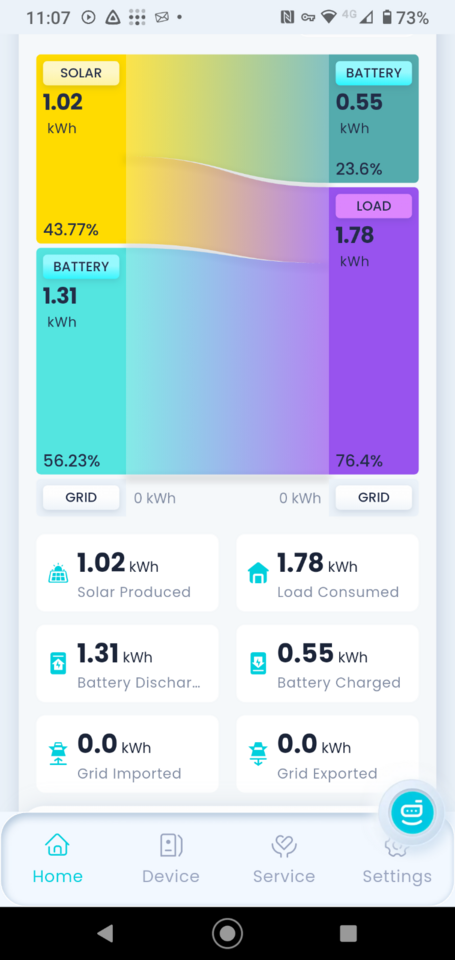
The system comes with an app that shows how the energy is being used. It’s quite cloudy this morning so the panels have only produced 1.02kWh. This diagram shows that some of the energy from the solar panels is powering the house, with the rest going to recharge the battery. Overnight, the house drew 1.78kWh from the battery and nothing from the grid so far.
Goodbye NAS, Hello Storage Box #
One of the disks in my Synology NAS has failed and I decided not to replace it. It’s a two-disk system in a RAID mirror so no data was lost, but this is the third disk failure in two years and the disk that failed was brand new 9 months ago so I decided not to spend any more money on this system. Instead, I have subscribed to a Hetzner Storage Box which gives me 1TB storage for less than £3 a month. (If needed, I could upgrade to 5TB storage for about £10 a month, but 1TB will suffice for now.)
My main use for the NAS was for backups from my laptops, server, and workstation. They all made daily backups to the NAS which in turn synchronised with B2 Cloud Storage. Instead, I will configure these to backup directly to the Storage Box.
The other thing I used the NAS for was streaming music to my phone via the Synology DS Audio app, so I was looking around for a replacement for this. I decided to try out Jellyfin which has many clients, including an Android app, but I might also give Navidrome a try to compare.
I installed Jellyfin in a podman container on my CoreOS server. I didn’t want to expose this on the public Internet so it’s only accessible via a Tailscale VPN (the same way I had setup services on the Synology NAS).
This is set up in a fairly typical way with Jellyfin running in a container alongside a sidecar container running Tailscale. These are both running in the same podman pod and share a podman network. I used ansible to install the quadlet configuration files for the network, volumes, and containers.
The only thing that tripped me up was when I came to add a caddy reverse proxy with automatic certificates for the tailnet. Caddy has built-in support for tailscale and, when it sees a request for a certificate for host on a tailnet, it will request a certificate from the Tailscale daemon. For this to work, it needs access to the Tailscale daemon socket, but Caddy and Tailscale are running in different containers so you need to create a volume that can be shared by both containers. Here are the ansible tasks for this:
    - name: Configure tailscale data volume
      ansible.builtin.copy:
        dest: /etc/containers/systemd/jellyfin-ts.volume
        content: |
          [Unit]
          Description = Create tailscale data volume for jellyfin

          [Volume]

          [Install]
          WantedBy = multi-user.target default.target
      notify:
        - Reload systemd
    - name: Create tailscale run volume
      ansible.builtin.copy:
        dest: /etc/containers/systemd/jellyfin-ts-run.volume
        content: |
          [Unit]
          Description = Tailscale volume for runtime data

          [Volume]
      notify:
        - Reload systemd
    - name: Create tailscale container
      ansible.builtin.copy:
        dest: /etc/containers/systemd/jellyfin-ts.container
        content: |
          [Unit]
          Description = Tailscale VPN for jellyfin
          After = network.target

          [Container]
          Image = docker.io/tailscale/tailscale:latest
          Pod = jellyfin.pod
          HostName = jellyfin
          Secret = tailscale-jellyfin-auth-key,type=env,target=TS_AUTHKEY
          Environment = TS_STATE_DIR=/var/lib/tailscale
          Environment = TS_SOCKET=/var/run/tailscale/tailscaled.sock
          Volume = jellyfin-ts.volume:/var/lib/tailscale:Z,U
          Volume = /dev/net/tun:/dev/net/tun
          Volume = jellyfin-ts-run.volume:/var/run/tailscale:z,U
          AddCapability = net_admin
          AddCapability = sys_module

          [Service]
          TimeoutStartSec = 900

          [Install]
          WantedBy = multi-user.target default.target
      notify:
        - Reload systemd
        - Restart pod
Mounting jellyfin-ts.volume at the same location in the caddy container
should give caddy access to the socket. Only it didn’t work!
On investigating, I saw that Tailscale was creating the daemon socket in /tmp
and creating a symlink from /var/run/tailscale/tailscaled.sock to the socket
in /tmp which, of course, could not be accessed from the other container. The
solution was to explicitly set TS_SOCKET=/var/run/tailscale/tailscaled.sock.
With this setting, the socket was created in the shared volume and caddy was
able to connect to the daemon to request a certificate.
Listening #
- Servant of the Empire by Raymond E Feist and Janny Wurts (Audio book)
- Cautionary Tales: And it went click (Podcast)
- Linux Dev Time: Episode 146 (Podcast)
- Drug Story: On Xanax and Anxiety (Podcast)
- Open Source Security: 2026 State of the Software Supply Chain (Podcast)
- Late Night Linux: Episode 378 (Podcast)
- Cup o’ Go: You get an error (Podcast)
- Ask the Hosts: Episode 35 (Podcast)
- Linux After Dark: Episode 118 (Podcast)
- Better Offline: LLM Code is Already Breaking Big Tech (Podcast)
- 2.5 Admins: Trivyally Infected (Podcast)
- Linux Unplugged: Automated Love Crunch (Podcast)